
Affiliate marketing works best when you know what’s actually going on behind the scenes. I remember when I first got into affiliate programs; tracking numbers and metrics felt overwhelming, and there was a lot of jargon tossed around. Now, I know focusing on the right metrics can make a huge difference in the results you see. Whether you’re just starting or looking to level up, tracking the right affiliate marketing metrics helps you optimize your efforts and earn more from your content.
What Are Affiliate Marketing Metrics?
Affiliate marketing metrics are measurements that help you see how your links, content, and strategies perform. They offer a window into what’s working (and what’s not) so you can adjust and improve. With affiliate marketing spending worldwide predicted to hit $15.7 billion in 2024, the competition is strong, and having solid data on hand gives you an edge.
Metrics aren’t just about chasing big numbers; they guide your decision-making, help you spot high-converting products, and show which channels are most effective for you. Understanding these numbers is super important for building trust with brands and, most importantly, boosting your commissions. Staying sharp with metrics can make all the difference between stagnant earnings and real growth in your affiliate business. By regularly reviewing and acting on your data, you set yourself apart from marketers who just “set and hope.”
Key Metrics Every Affiliate Marketer Should Track
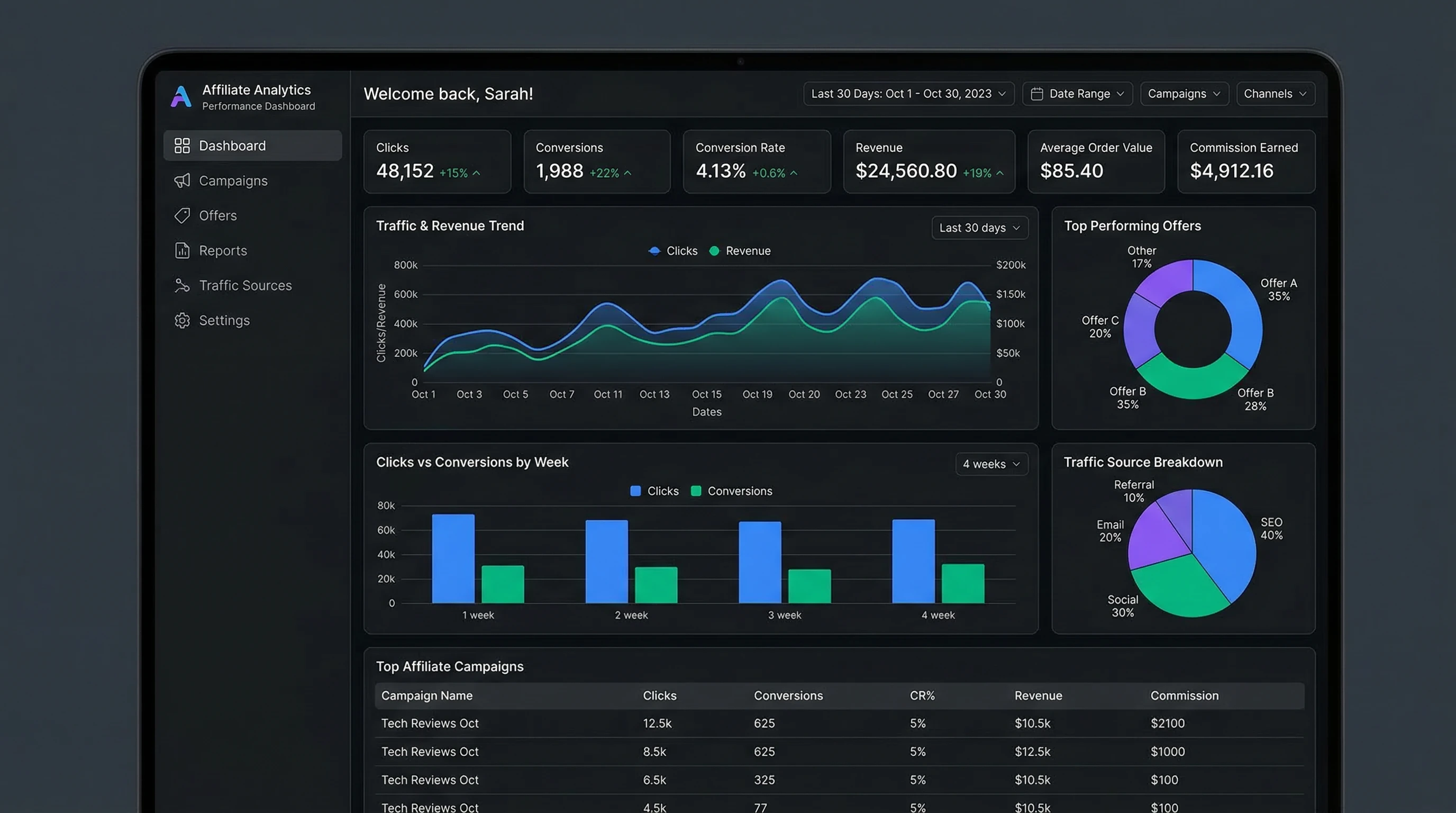
Different programs offer different dashboards, but most will show a core set of metrics. Here’s a breakdown of the most useful stats and why they’re really important for steady growth as an affiliate marketer:
- Clicks (ClickThroughs): This tells you how many times people have clicked your affiliate links. A higher number means your content is attracting attention and getting people interested enough to check out the offer.
- Conversions: This is the number of people who actually make a purchase (or complete another desired action) after clicking your link. Conversions matter because that’s where you actually earn money for your efforts.
- Conversion Rate: Calculated by dividing conversions by clicks, this percentage shows how effective your landing page or offer is at turning curious visitors into buyers.
- Commission (Earnings): This is what you take home. Your final payout depends on the program’s structure; sometimes it’s a flat rate, other times it’s a percentage of the sale.
- Average Order Value (AOV): This stat tells you how much customers tend to spend per transaction. Higher AOVs mean you can earn more per conversion, especially if your program pays a percentage. You may also find ways to nudge readers towards add-ons and bundles to boost this number.
- Traffic Source: Knowing where your clicks and conversions come from (e.g., Google, Instagram, blog, email) helps you focus your energy on channels that drive results. Often, one source outperforms all others—optimizing for that channel can pay off big.
- Return on Investment (ROI): If you’re spending money on ads or tools, this metric helps you work out if what you’re earning is worth the expense. Tracking ROI is crucial if you invest cash upfront; otherwise, you might overspend for little return.
Getting Started: Where to Find Your Metrics
Most affiliate programs and networks give you access to a dashboard with basic performance data. Platforms like Amazon Associates, ShareASale, and CJ Affiliate offer clear reports on your clicks, commissions, and other key stats. If you use your own site, you can also check Google Analytics for a deeper look at what’s driving your affiliate traffic. For those comfortable with a little tech, linking Google Analytics and Google Tag Manager can give extremely detailed views of visitor actions on your site—down to which buttons they click before converting.
When you’re setting things up, check if your network allows tracking with UTM parameters or custom IDs. These are pretty handy for spotting which links or campaigns work best. A little extra setup at the start helps a lot down the line and gives you more accurate reports to act on every month.
Understanding What Each Metric Means for Your Strategy
Metrics aren’t just numbers to check off; they tell a story and point you in the right direction for growth. Here’s what I look for when checking reports, and how you can use them to shape your next moves:
- Low Clicks, High Conversion Rate: Your content does a great job qualifying people but isn’t reaching enough eyeballs. This might mean you need more targeted traffic, maybe through SEO, social, or paid channels—testing a few new platforms could open up untapped traffic.
- High Clicks, Low Conversion Rate: People are curious but bouncing before checking out. This could signal the product isn’t a great fit, the offer isn’t attractive, or your landing page could use a tuneup.
- Steady Clicks, Dropping Earnings: If your earnings go down while your clicks stay high, maybe the commission rates or product prices have switched up. It’s worth keeping an eye on any program changes, or possibly mixing in some variety with more brands to safeguard your income.
- Jump in AOV: Seeing a spike in the average order value? You might want to highlight bundle deals or recommend similar higherpriced products since these can boost your commissions without driving more traffic.
Quick Guide to Improving Your Affiliate Marketing Metrics
Boosting your stats is about smart tweaks, not huge overhauls. Here are some actionable ways I’ve found useful over the years:
- Optimize Your Content: Sharpen your callstoaction and make sure your affiliate links stand out. Try different placements for your links; sometimes moving them higher up or repeating them in longer content brings more clicks. Adding unique, honest reviews and comparison tables can also increase trust and boost clicks.
- Test Landing Pages: If your conversion rate needs help, test different product pages, or even create your own bridge pages with helpful info before sending folks to the merchant. This extra step can clarify offers and raise confidence with your visitors.
- Pick Better Offers: Not all products convert well. If something isn’t getting traction, swap it for a similar offer with stronger reviews or a more compelling pitch. Also, watch for seasonal trends; some products spike during certain holidays or events.
- Use Multiple Channels: If you only post links in one place, you’re leaving money on the table. Sharing across your site, email list, and social platforms brings in more diverse traffic, and sometimes unexpected winners. Repurposing your content for different platforms can double or triple impressions without much extra work.
- Regularly Check Stats: Don’t just set and forget your affiliate links. Make a habit of checking metrics weekly or monthly. Trends pop up that would otherwise go unnoticed. This regular review keeps you proactive instead of reactive and helps spot new growth areas.
Challenges When Tracking Affiliate Metrics (and How to Deal With Them)
It’s not all smooth sailing. I’ve run into a bunch of tracking headaches over time. Here are some common issues, plus tips on how to handle them smartly:
- Tracking Delays: Some programs take a while to update stats or hold commissions until the refund period passes. Give it a few days before worrying about missed conversions.
- Attribution Problems: Visitors come from lots of places, and sometimes the sale gets credited to a different source (especially with “lastclick” models). Using unique tracking IDs helps you spot where your real buyers start out. Some platforms now offer “firstclick” attribution to reward initial referrals.
- Data Accuracy: Ad blockers or privacy tools can sometimes stop tracking scripts. While you can’t catch every single click, consistently using UTM tags and checking multiple data sources keeps your info more reliable. You might still miss a small portion of data, but having a few tools working together (affiliate dashboard, Analytics, links with tags) lessens the impact.
Getting a handle on these challenges early saves a lot of confusion later and helps you run a cleaner, more transparent affiliate business. It’s also good for staying in the good graces of brands—reliable numbers strengthen relationships and improve negotiating power.
Real World Examples: Why Tracking Makes a Big Difference
Here are a few scenarios I’ve seen firsthand that show why tracking is key:
- Example 1: A blogger tracking source data noticed Instagram brought far fewer clicks than Pinterest, but Instagram traffic bought more often. By focusing more on Instagram, they earned higher commissions with less effort.
- Example 2: An affiliate saw a sudden drop in conversion rate and, after checking, found the merchant had changed its landing page. By switching products, they got their earnings back up quickly and maintained consistent income.
- Example 3: Someone running paid ads compared ROI across campaigns and stopped a few that never broke even, saving hundreds a month by checking this one metric. This freed up money for investment in more effective ads, boosting total profit month over month.
Questions People Often Ask About Affiliate Marketing Metrics
Affiliate marketing comes with a learning curve. Here are some FAQs I get all the time:
Question: What’s a good conversion rate for affiliate marketing?
Answer: This really depends on the niche and product. For most affiliate marketers, conversion rates between 1% and 5% are considered pretty solid. Some welltargeted campaigns go much higher, while broad campaigns might land lower initially.
Question: How can I track which blog posts or campaigns drive the most sales?
Answer: Use UTM parameters or subIDs in your affiliate links. Most programs let you add these for free, and tools like Google Analytics can break down traffic even further. Tracking at the post or campaign level helps you double down on winners and fix or drop underperformers.
Question: Do I need to pay for tracking software?
Answer: Not usually. Most starter programs and networks provide basic metrics. Paid tools like Voluum or ClickMeter are helpful if you’re running a lot of campaigns or need advanced features, but many creators get by just fine with what’s built in. Start simple and only upgrade tools as demand grows.
Why Tracking Metrics Matters More Than You Think
Getting familiar with affiliate marketing metrics helps you spot opportunities, fix weaknesses, and build a more reliable revenue stream. It’s not just about checking stats for the sake of it; it’s about understanding your audience and what actually motivates them to click and buy. The more you know, the steadier your business can grow—no more guessing or chasing shiny objects without proof.
Making small tweaks based on real data can boost your commissions and help you spend your energy on what works best. The more you understand your affiliate marketing numbers, the easier it becomes to grow and succeed, one smart move at a time. Even modest improvements, tracked over time, can lead to impressive overall gains in commissions and business stability. In the end, success in affiliate marketing is built on being proactive, informed, and adaptable, staying sharp as new trends come and go.