
Web analytics might sound a little intimidating at first, but it’s honestly a super useful tool for anyone running a website. Whether you’re running a blog, an online store, or a business site, understanding how people use your website gives you a real edge. Web analytics helps you see where visitors are coming from, what they do while they’re on your site, and what actions they take before leaving. So, I’m going to walk you through the basics and show you how to get started, even if you’re new to all this.
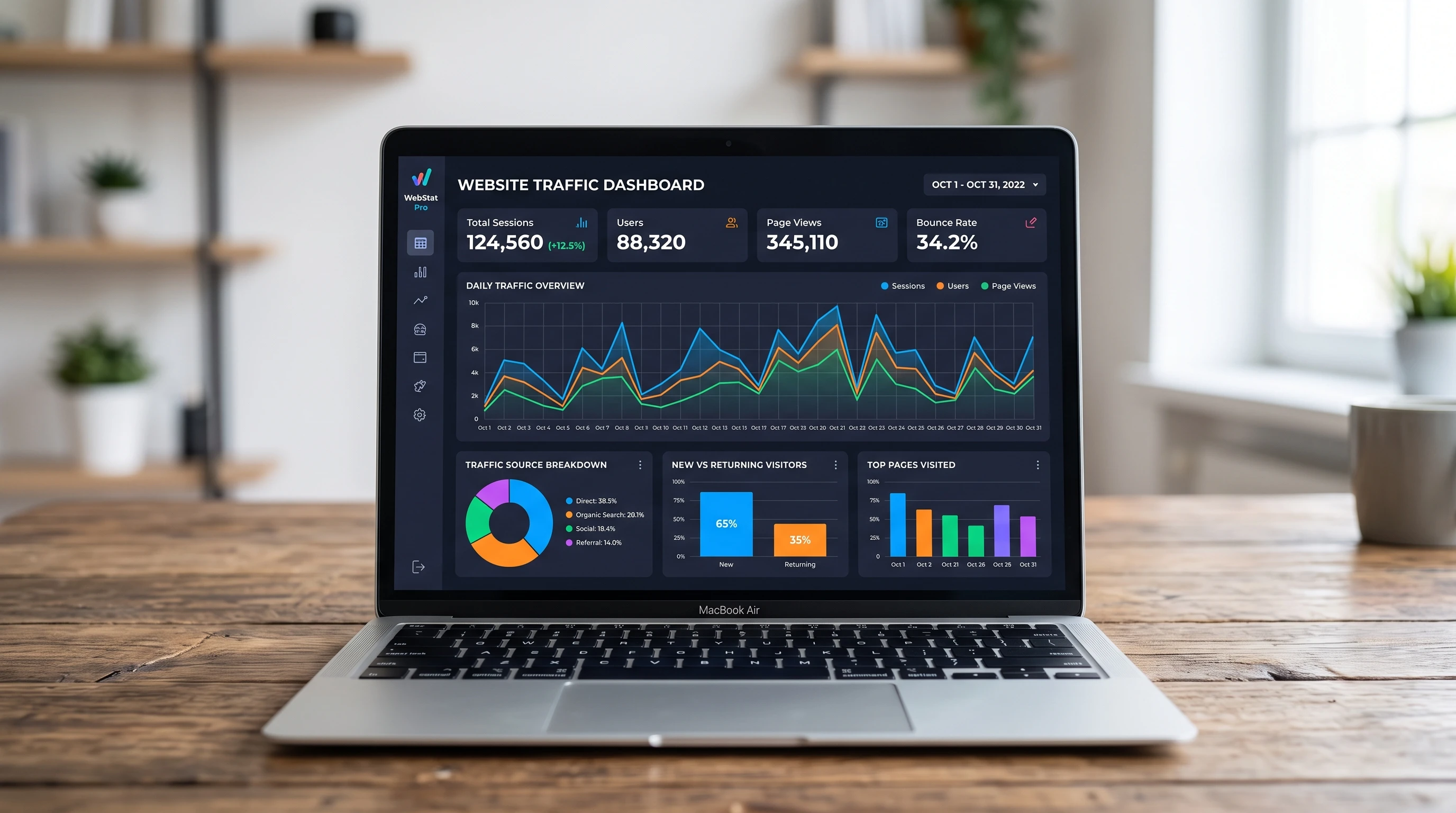
What Is Web Analytics and Why Bother With It?
Web analytics isn’t just about looking at numbers. It’s really about understanding your visitors and figuring out ways to make your website better for them (and you). Whether you want more people to sign up for your newsletter or buy your products, web analytics shows you what’s working and what might need a tweak.
It helps you answer questions like:
- Where do my visitors come from? You’ll see if folks are finding you through Google, social media, or other websites.
- What pages do people visit? This shows what content grabs attention or needs improvement.
- How long do they hang around? If they’re leaving super quickly, there might be something off.
- What goals are getting accomplished? You can track sign-ups, purchases, or anything else important on your website.
When you can see these things clearly, it gets way easier to improve your site and grow your audience. Plus, you’ll have real data to help you make choices, rather than just guessing or hoping your efforts are working.
Core Concepts for Beginners
Web analytics uses a bunch of terms that aren’t always obvious. Here are a few terms you’ll see over and over:
- Pageviews: Total times a page is loaded in a browser. If someone reloads, it counts another pageview.
- Sessions: One visit to your website. A session can include multiple pageviews.
- Bounce Rate: The percentage of people who leave after just seeing one page. Lower usually means people are sticking around.
- Traffic Sources: Places where people are coming from (search engines, referrals, social media, or directly typing your URL).
- Conversion: When someone takes a key action, like signing up or buying something.
Getting a grip on these basics is really helpful when you get into your first analytics dashboard. Many tools offer glossaries or guides to walk you through unfamiliar terms. If you ever feel stuck, just search for the term in the tool’s help section or check out beginner tutorials online.
Choosing the Right Web Analytics Tool
There are lots of tools out there, but the most common one for beginners is Google Analytics. It’s free, super detailed, and has tons of guides and help online. Here are a couple of popular options worth checking out too:
- Google Analytics (GA4): Great for tracking user journeys and events.
- Matomo: Opensource and privacy focused—you control your data.
- Simple Analytics: Minimalist interface and super easy for newcomers.
No matter what tool you choose, the basics are pretty similar. You’ll set up some code on your site (which most web hosts or site builders make easy) and start tracking visitor activity right away. Some platforms even offer builtins that make getting started just a matter of clicking a few buttons.
Getting Started: Setting Up Analytics Step by Step
Starting with web analytics usually means adding something called a “tracking code” to your website. Here’s what the general process looks like for most sites:
- Sign up for your chosen tool. Google Analytics just requires a Google account to get started.
- Add your website. The tool will ask you for your site’s name and URL.
- Get your tracking code. This is a small snippet of code you’ll copy.
- Paste the code into your site. For most platforms (like WordPress, Wix, Shopify), there’s a setting or plugin that guides you through where to paste this code.
- Check if it works. Give it a little time, then look in the analytics dashboard to make sure data is showing up.
Once you’re set up, data starts rolling in pretty much immediately. It doesn’t take days or weeks—just a few minutes and you’ll start getting insights into your audience.
Things That Trip Up Beginners (And How to Avoid Them)
It’s easy to get lost in web analytics if you head in without a game plan. Here are some common mistakes I see and how I tackle them:
- Trying to look at too much data: I always pick one or two key metrics to focus on when I’m new to a site. Overloading yourself just gets confusing.
- Ignoring your goals: It helps to think about what you want to achieve before you open up your reports. Is it more visitors? More sales? Base your analysis off those goals. Set clear goals so you know what success looks like before you dive into data.
- Forgetting about privacy and compliance: Different countries (like those in the EU with GDPR) require clear cookie consent. Always check what’s needed in your area. If you get visitors from different regions, set up notices or consent tools on your site for peace of mind.
- Overreacting to single data points: Numbers bounce up and down naturally. Patterns matter way more than one weird spike or dip. Stay calm and watch for broader trends before switching up your strategy.
Focusing on What Matters: Setting Goals
One of the best ways to make web analytics useful is to set up Goals or Conversions in your analytics tool. For example, I set a goal for when someone fills out my contact form or downloads an ebook. When you know what actions matter on your website, it’s a lot easier to measure your progress. Every site will have its own unique goals; take a few minutes to list out what really matters for you before getting deep into the numbers.
Tracking Different Types of Traffic
Traffic sources can say a lot about how your website is doing. If you’re getting a lot of visitors from search engines (organic traffic), it’s a good sign your SEO is working. If social traffic is low, maybe it’s time to post more often on your favorite platform or try something different on social media. Email or referral traffic might tell you whether guest posts or partnerships are delivering results. Use this information to shape your outreach efforts and content ideas.
Spotting Bounce Rate Issues
If you notice your bounce rate is high, check these things:
- Is your page loading slowly?
- Is the content relevant to what people searched for?
- Is the design easy to use and mobilefriendly?
- Are popups or ads turning people away?
Tweaking these things can really help keep people exploring your site longer. A lower bounce rate usually means visitors are finding value and are more likely to take action on your site.
Some Handy Tips to Get the Most Out of Analytics
There are a few things I always try to keep in mind that help me get real value from analytics:
Check your analytics regularly. Once a week is enough for most small websites. Setting up a simple schedule helps you catch trends sooner.
Compare data over time. I like to look at what’s changed over the past month or quarter instead of just checking today’s numbers. This helps me spot seasonal shifts or the impact of any changes I make.
Try out “event tracking.” Most tools let you track clicks on buttons, downloads, or video plays. This offers way more insight into what people actually do on your site. Set up events for important actions so you’re not guessing about what’s working.
Connect Google Search Console. If you’re using Google Analytics, linking Search Console lets you see which search terms bring people to your site. It’s super helpful for improving SEO. Checking your top keywords helps you tune your content to what people really want and grow your organic traffic with the right topics.
Web Analytics in Action: RealWorld Examples
Here’s how I use web analytics for different types of websites:
- For a blog: Seeing which articles get the most views helps me plan future topics. If people stick around after reading a post, I know it’s engaging content. I also look for posts with high bounce rates or little engagement, which helps me decide what to improve or rethink next time.
- For an online store: Tracking the sales funnel shows me where shoppers drop off. That way I know which page needs a closer look. Are people leaving from the cart page? It may be time to make the checkout process easier or offer a quick discount.
- For a nonprofit site: Monitoring donation button clicks helps me judge if new fundraising campaigns are working. Comparing this data to previous campaigns helps me figure out what messages hit home with supporters.
You can really check out almost every type of website and learn something useful. Web analytics doesn’t just help big businesses—it can make a difference for small passion projects, community groups, or creative portfolios, too.
Frequently Asked Questions
It’s normal to have a bunch of questions at the start, so here are a few I get asked a lot:
Question: Do I have to be a techie to use analytics?
Answer: Not at all. Most analytics tools are way more userfriendly these days. You can get a lot of useful info just by exploring the dashboard, and there are tons of beginner tutorials online. Look for tools that cater to beginners with easy-to-read reports and helpful guides.
Question: Will web analytics slow down my website?
Answer: The main tools use a lightweight script, so you’re probably not going to notice any slowdown. If your site is running really slowly, the issue is probably somewhere else. Always make sure you’re using the latest code version and avoid stacking too many plugins.
Question: What’s the difference between sessions and users?
Answer: Sessions count each visit, no matter who it is. Users count unique people (as best the tool can guess). If I visit a site five times in one week, that’s five sessions but one user. These metrics together help you spot whether your actual audience is growing or just coming back more often.
Question: Is web analytics legal everywhere?
Answer: It’s totally legal, but some countries have strict rules on tracking and cookies (like in the EU). Using cookie consent banners and following privacy rules is important if your visitors come from those regions. Make sure to stay up to date with current laws—keeping an eye out for changes never hurts.
Next Steps for Getting Deeper
Now that you’ve got a feel for web analytics basics, you can start exploring more advanced features when you’re ready. Things like goal funnels, A/B testing, or even custom dashboards open up new ways to learn from your visitors. Try experimenting with setting up custom events, tracking scroll depth, or analyzing which pages keep users coming back again and again.
The key is to stay curious and keep experimenting. The more you use web analytics, the more comfortable you’ll get. Pretty soon, you’ll be making smarter decisions for your website and seeing real improvements. Every site is different, so don’t be afraid to try new things until you find what works best for you. Happy analyzing!