
TikTok analytics can be a real game changer if you want to grow your account and get your content in front of more eyes. Whether you just started posting fun videos or you’re brainstorming new ways to go viral, understanding analytics helps you see what’s working, what needs tweaking, and where your next big opportunity might be hiding. I’m going to run through how to actually use TikTok analytics to shape up your content strategy in a practical, easy-to-follow way.
An Introduction to TikTok Analytics
Digging into TikTok analytics is about more than just tracking likes and numbers. It’s about understanding your audience, timing posts for the best reach, and figuring out which types of videos really catch people’s attention. With over one billion monthly users, TikTok is a crowded space, so even small insights can make a big difference in how your videos perform.
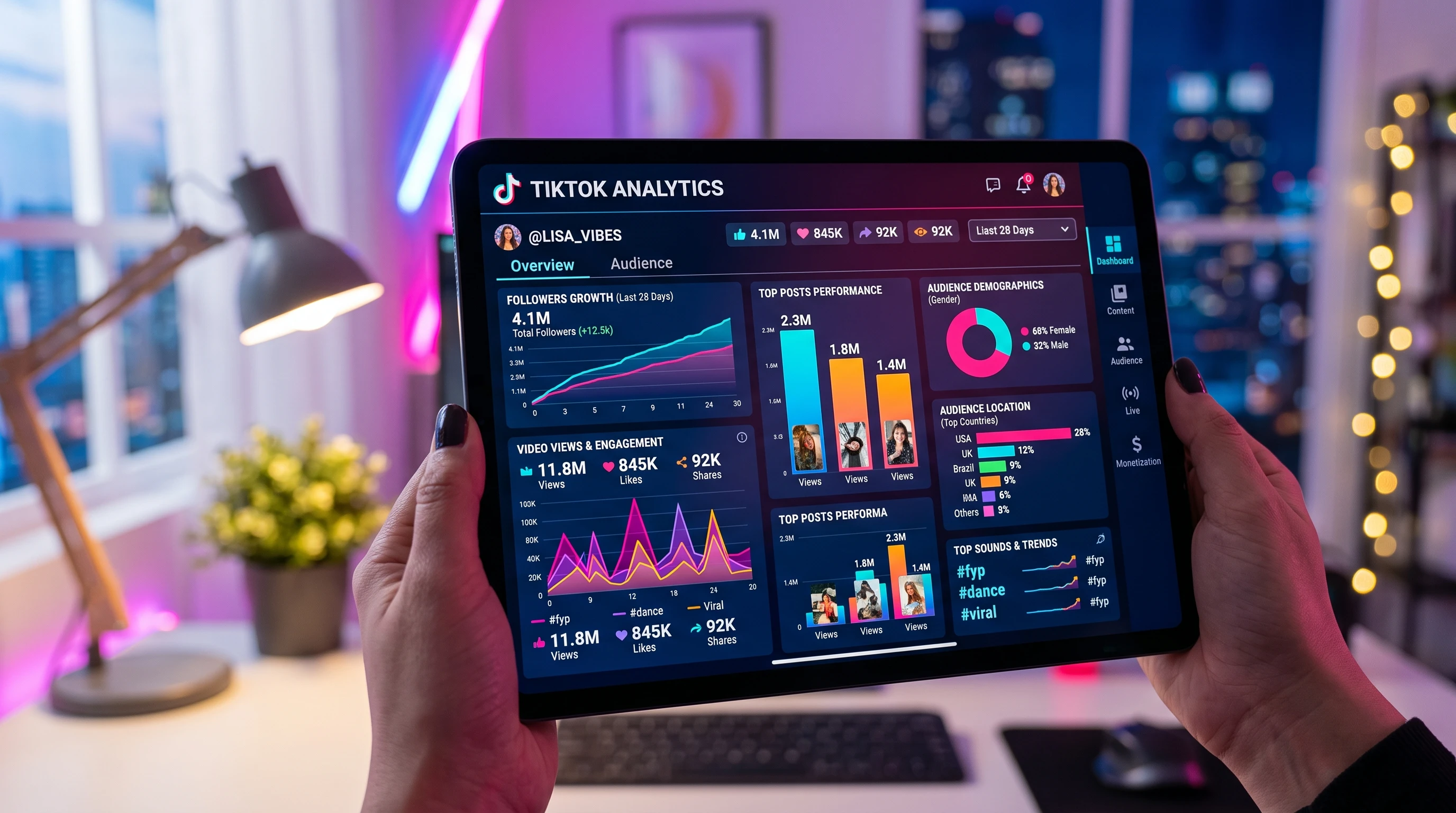
TikTok analytics comes built into Pro Accounts, which you can easily switch to for free. Having access to this dashboard opens up lots of metrics that show everything from who’s watching your videos to which posts get shared most often.
Staying on top of trends and performance data is really helpful. Reports like those from Hootsuite show brands and creators who use analytics see better engagement rates and more consistent growth. If you want to make your mark, learning these basics sets you up for smarter, data-backed decisions.
Getting Started with TikTok Analytics
First things first: unlock TikTok analytics by switching to a Pro or Business account under your account settings. Once you’re in the dashboard, things can seem a bit overwhelming, but I’ll break down the main areas to focus on as you start exploring:
- Overview Tab: Quickly check total followers, profile views, and video views across the past week or month for a birds-eye view of your growth.
- Content Tab: Look deeper into individual video performance such as watch time, traffic sources, and like or share counts for each post.
- Followers Tab: See info about your audience’s age, location, gender, and when they’re most active. This is super useful for scheduling posts that hit at the right times.
Taking the time to explore these tabs gives you a solid foundation before getting into more advanced data and trends later on. You’ll find that getting familiar with each tab really is worth it, as it sets you up for better results down the road.
Quick Guide to Using TikTok Analytics for Content Planning
Instead of guessing what might work, analytics shows you concrete patterns and lets you spot opportunities. Here’s a step-by-step way to use key analytics for better content planning:
- Identify Top Performing Content: Use the Content Tab to check which videos earned the highest watch time or shares in the last month. These are clear indicators of what your audience enjoys most.
- Review When Your Audience is Most Active: Check the Followers Tab to figure out time slots when most followers are scrolling TikTok. That’s a smart posting window and can really make a difference in how many people see your content.
- Analyze Audience Demographics: Get a feel for your audience, from age groups to country breakdowns, to spot trends or new groups to target. You might stumble upon a group you didn’t expect to be interested in your content.
- Track Growth Spikes: See if there are certain days or types of content where your profile or video views jump up. Try to figure out what triggered the spike. Was it a trend, an effective hashtag, or a new format?
- Spot Trends and Replicable Content: Match your best performing videos with video styles, hashtags, or topics to replicate what works. Consistency is key.
Using this info, you can line up future content ideas with what your audience already likes, giving each post a better shot at good engagement. As you keep creating, these insights let you adjust your approach and double down on winning formulas.
Things to Consider Before Shaping Your TikTok Content Strategy with Analytics
Jumping into analytics can feel a bit much at first, and there are some common sticking points and questions that pop up. Here are practical things I always keep in mind when using analytics to decide what to post next:
- Interpretation Takes Practice: Analytics data is super useful, but you have to dig deeper than just numbers. For example, a video with lots of views but low watch time means people clicked but didn’t stick around, so something about the start or messaging might need to change.
- Viral Content Isn’t Always Repeatable: Sometimes a video goes viral for a seemingly random reason, so it doesn’t guarantee repeats if you use the same trick again. Consistent improvements easily beat chasing sudden spikes.
- Focus on Quality Over Quantity: Flooding your feed doesn’t always equal more reach. Analytics will often show that a few high quality videos bring better engagement than loads of low effort ones. High quality, less frequent posts often work better.
- Be Flexible: TikTok trends and algorithms can switch fast. Even if your analytics say one strategy works now, keep checking back so you’re not stuck on outdated tactics. Staying sharp and the willingness to switch things up pays off.
Watch Time and Completion Rates
TikTok wants people to spend time on the app, so one of the top signals for the algorithm is average watch time and completion rate (how many viewers finish your video). If people are sticking around to the end, it’s a good sign, and analytics will highlight those videos. Use this as a signpost, and test which video hooks or formats keep viewers engaged; make tweaks based on the results.
Traffic Sources
TikTok analytics lets you see if most traffic came from the For You Page, your profile, or your followers. Tracking this helps you create content that can reach new people, not just your current audience. It can point out if your recent content is ending up more in one spot than another and whether you need to adjust your outreach.
Follower Insights
Demographic breakdown is pretty handy. Maybe you’re attracting a younger crowd or reaching viewers in new regions. Try tailoring some content styles or references for these groups if you want to test your reach or grow in a certain direction. For instance, if you spot more international viewers, try adding visuals or sounds that connect with them.
Learning what every metric actually means goes a long way toward making analytics useful rather than confusing. The more you jump in, the easier it gets to spot patterns worth acting on, and the better you’ll get at making each video count.
Advanced TikTok Analytics Tips
After you’ve got a handle on the basics, there are a few advanced moves to really step up your analytics game for content planning:
Experiment With Hashtags Strategically: TikTok analytics can tell you which hashtags pull in extra views or reach outside your followers. Vary these and track performance; tracking can reveal new opportunities for discoverability and can help you stumble upon untapped audiences.
Test Multiple Video Styles: Alternate between trends, original series, and short skits. Let analytics tell you which get the most saves, shares, or completion rates. Repeating what works, with a few tweaks, often builds momentum faster than trying something totally new every time.
Use Comparative Testing: If you’re not sure what works best, run A/B tests by posting similar videos with slight changes, like intro style or audio track, and see what analytics say. Over time, you’ll notice small changes that make a big impact on views or engagement rates.
Monitor Long-Term Growth Trends: Don’t just look at short bursts; track your growth over months. Analytics can highlight steady improvements, like more regular plays or follower bumps around certain topics, especially if you consistently target what resonates with your audience.
Even for advanced users, analytics is about getting feedback, learning quickly, and acting on those insights before trends pass by. These habits help keep your strategy sharp in the everchanging TikTok space and can position you ahead of the curve.
Tools and Metrics Beginners Should Prioritize
There’s a lot of data on TikTok, so starting out, it helps to focus on a few metrics and tools that drive the biggest improvements:
- Average Watch Time: Shows how long people stick around for your videos. Higher is almost always better; aim to keep your viewers as engaged as possible.
- Follower Growth Rate: Tracks how fast your audience is expanding so you can measure momentum. A steady increase is a strong sign your content is on the right path.
- Engagement Rate: Combines likes, comments, and shares per video. Great for seeing which content actually “lands” with viewers and sparks a reaction.
- Trending Videos Section: In analytics, shows which of your posts are picking up speed or connecting with new viewers. This is helpful for doubling down on popular themes or ideas.
For anyone posting consistently, focusing on these areas first usually brings the fastest, clearest results. As you grow more familiar with analytics, try branching out to more advanced stats to fine-tune your approach even further.
- Creators Building a Community: Analytics helps spot what type of personal stories or inside jokes grab your current followers. This is super important if you’re growing a niche community and want to keep engagement high.
- Businesses and Brands: Timing product drops and announcements based on peak follower activity and refining messaging with demographic insights can really give your campaigns a lift. Data can guide you to the right moment to maximize your reach.
- Trend Trackers: If you like riding trends, analytics will show which trendbased videos actually get reach, so you can put more effort where it matters and possibly set the next trend yourself.
Frequently Asked Questions
New TikTok creators often have a lot of questions about making the most of analytics. Here are a few I hear and answer regularly:
Question: How can I access TikTok analytics?
Answer: You just need to switch to a Pro or Business account. Open settings, tap “Manage Account,” and follow the simple steps. The analytics panel will be available in your settings.
Question: Which metric matters most for going viral?
Answer: Watch time and completion rate are big signals for TikTok’s algorithm. If viewers are watching to the end, chances go up that your video makes it onto the For You Page and possibly takes off.
Question: How often should I check analytics?
Answer: Checking weekly is usually enough for most creators. If you’re testing big changes or running a campaign, you might want to peek more often to catch spikes or adjust quickly. Keeping a regular schedule makes it easier to spot real patterns.
Putting TikTok Analytics Into Action
Taking action on what you find in TikTok analytics can boost your growth and creativity over time. Understanding audience activity, experimenting with formats, and doubling down on what already works are solid ways to improve your content strategy. TikTok rewards those who keep learning and adjusting, so keep poking around in your dashboard, keep creating, and watch your account grow. With a little practice, you’ll find that analytics not only shows you what works, but makes creating and planning your videos more fun and rewarding. Keep at it, stay curious, and soon you’ll see your efforts pay off in both engagement and reach.