
If you’re using Pinterest to grow your business, blog, or creative brand, you probably know how important it is to keep your content flowing and your analytics sharp. Pinning by hand can quickly become overwhelming, especially if you’re aiming to reach new audiences or build out seasonal content plans. That’s where pin scheduling and analytics tools come in; they take the guesswork out of when and what to post so you can focus on creating, not just clicking.
Why Pinterest Scheduling & Analytics Tools Matter
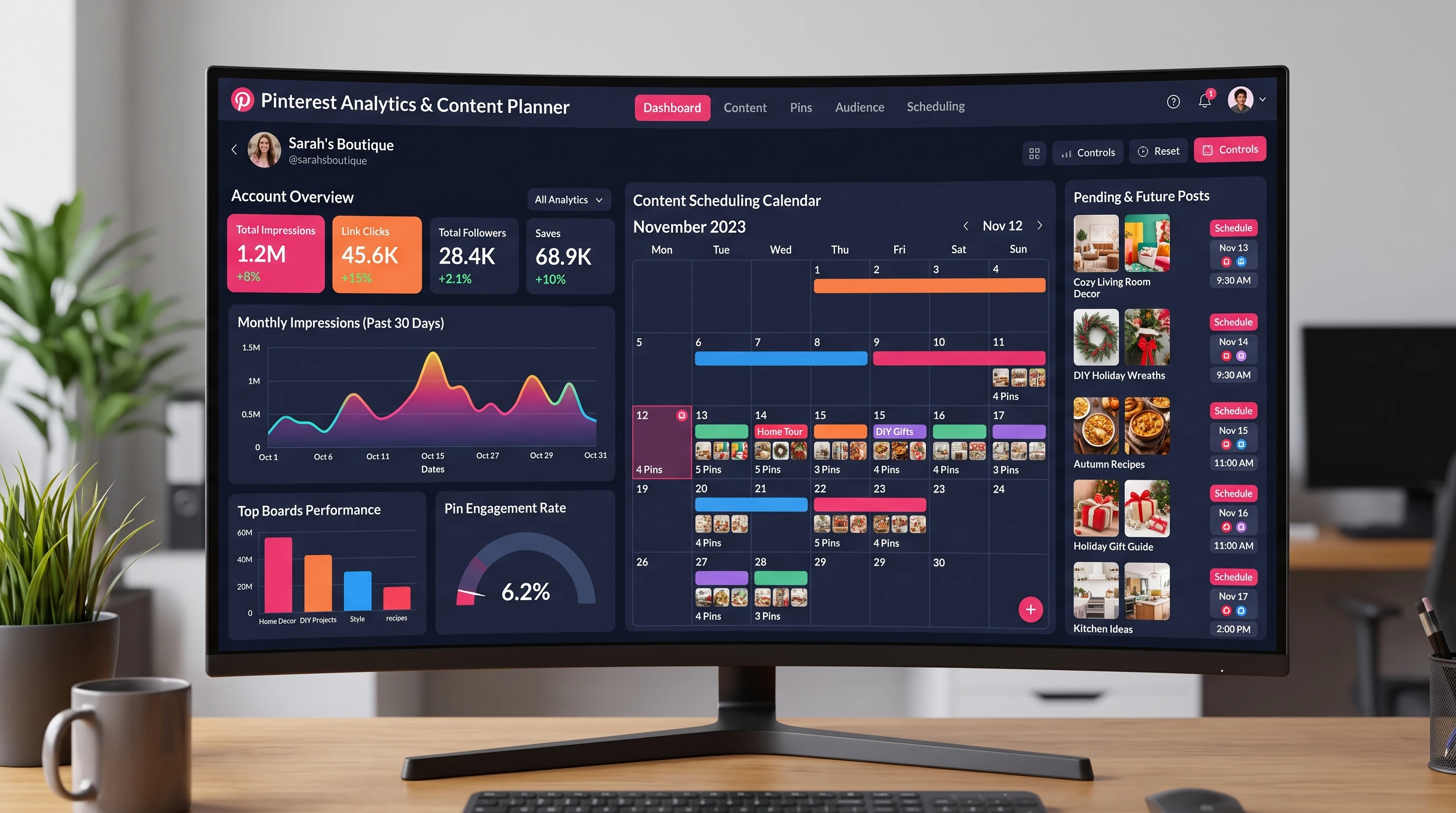
Pinterest isn’t just another social media platform, it works like a visual search engine, where the right timing and data-driven choices can send your traffic soaring. Schedulers help you keep your feed fresh around the clock, even when you’re not online. Analytics offer a backstage look at which Pins get people clicking, saving, or actually heading to your site. Using the right set of tools can lead to better consistency, bigger reach, and a lot less stress trying to manage it all manually.
With millions of pins competing for attention every day, using powerful scheduling and analytics tools just makes your strategy smarter and your workflow much less chaotic. These tools have grown to offer drag-and-drop scheduling, automatic repins, team collaboration, and pretty deep analytics—features that save you tons of time and help you spot what’s actually working.
Getting Started With Scheduling Your Pinterest Content
Building a Pinterest workflow that doesn’t eat up your entire week starts with understanding the basics of scheduling tools. Most of these platforms connect directly to your Pinterest account, let you plan Pins in advance, and offer features to spread them out for the best possible reach. Here’s what you can expect when you start using one:
- Visual Calendar: See your scheduled pins laid out in a calendar format, so you know exactly what’s going live and when.
- Bulk Uploading: Add lots of pins at once (think seasonal roundups or new product launches) without endless repeats.
- Board Organization: Assign pins to specific boards for better targeting and cleaner board layouts.
If you’re wondering what counts as a “good” scheduler, look for features like drag-and-drop functionality, smart scheduling (where the tool suggests peak times), and autolooping for evergreen content. Try a few different options to see what matches your workflow best.
Top Pinterest Scheduling Tools Worth Checking Out
Several tools are particularly popular for Pinterest content planning, with their own unique advantages. I’ve tested a bunch, and here are some that are really reliable and userfriendly:
- Tailwind: This is a crowd favorite for Pinterest and also works with Instagram. It lets you schedule Pins, find the best times to post, and even use “SmartLoop” to recycle your top Pins automatically. The analytics dashboard is easy to read, breaking down engagement and reach at a glance. Learn more.
- Buffer: Known for its clean scheduling interface, Buffer supports Pinterest among other platforms. You can plan pins around the clock, see basic stats, and keep your boards organized. Its browser extension is pretty handy if you spot content in the wild you want to pin later.
- Later: Originally built for Instagram, Later does Pinterest scheduling, too. It has a drag-and-drop calendar, simple scheduling workflows, and some analytics to track how your pins perform. The visual planning features make it a great fit for creatives.
- Canva Scheduler: If you use Canva for graphic design, its paid plans include a built-in scheduler for Pinterest. You can design your pin, schedule directly inside Canva, and manage your posting calendar without jumping between apps. It’s a huge time-saver for those who batchcreate visual content.
- Planoly: Planoly added Pinterest to its roster recently. If you like having your visual branding in one spot, this tool makes it simple to schedule both Instagram and Pinterest together. The visual layout helps if you want to keep your boards looking cohesive.
Each of these tools offers a free trial or limited free plan, so it’s easy to compare them side by side. Tailwind is usually the most feature rich if Pinterest is your main focus, while Buffer and Later are great if you’re managing several social platforms at once.
Digging Into Pinterest Analytics: What To Track
Scheduling only gets you half the way; knowing what works is where analytics come in. Even if you’re just starting out, a glance at your analytics can show what’s resonating with your audience and what needs a tweak. Here’s what I like to track:
- Impressions: Shows how many times your pins are displayed. More impressions mean your content is showing up in searches or home feeds.
- Outbound Clicks: These clicks lead directly to your website or destination URL, which is pretty useful if your main goal is traffic.
- Save Rate: Whenever someone saves your Pin to their board, that’s a good indicator you’ve hit on something inspiring or valuable.
- Top Boards & Pins: See which boards and pins consistently perform well. This can help shape the topics or styles you prioritize going forward.
Most quality scheduling tools have builtin analytics, but it’s also worth checking out the native Pinterest Analytics dashboard, especially if you want the full (and free) depth of your Pinterest data. Use what you see to double down on what’s working and experiment with new ideas for the next round of pins.
Tips For Making the Most of Your Pinterest Tools
Getting comfy with Pinterest tools can make your workflow smoother and your results stronger. Here are some practical things that make a real difference:
- Batch Schedule: Set aside an hour each week to plan and schedule all your pins. This keeps your account active without daily interruptions.
- Test Different Posting Times: Try posting at various times to catch different audiences. Use analytics to spot the sweet spots for engagement.
- Use Templates for Pin Design: Save time with reusable templates for your pins, adjusting colors and text for new content. Many schedulers integrate directly with design tools like Canva.
- Refresh Evergreen Content: Use the recycling or looping features in tools like Tailwind to bring older pins back to life, especially your top performing seasonal pins.
- Review Analytics Regularly: Take a quick look at your analytics each week or month. Track what’s climbing and what’s slipping to make data driven tweaks.
The more you use these tools, the more you’ll spot patterns that help you plan smarter and save a bunch of time. Also, don’t forget to check for updates and new features that can give your Pinterest approach a fresh twist, since these platforms update pretty often to keep up with Pinterest’s changes.
Stuff You Don’t Want to Overlook Before Picking a Pinterest Tool
With so many Pinterest tools popping up, there are a few practical things worth considering to help match the best one with your goals:
- Supported Features: Some tools focus only on basic scheduling, while others add advanced analytics, team workflows, or extra content design elements.
- Pricing: Prices range from totally free to monthly or yearly subscriptions. Most offer a free starter plan, which can be great for testing things out.
- User Experience: If you get frustrated fighting with a clunky interface, you’re less likely to stick with it. A clean, intuitive dashboard makes scheduling and analytics easy to use daily.
- Pinterest API Approvals: Make sure any tool you’re considering is an official Pinterest partner or uses Pinterest’s API. That means your account will stay compliant and safe from accidental bans.
- Support & Updates: Good customer support comes in handy, especially if you’re new to Pinterest marketing. Some tools also offer active communities or training resources if you want to pick up new tactics.
Careful research helps buyers make informed decisions. Trying out the free version first usually helps you get a real feel for what fits your style and needs, and you can always make the move to a premium plan as you grow.
Pricing and Free Trials
Many Pinterest schedulers use a subscription model, but almost all have free trials or free tiers. If you’re just managing a couple of boards, the free versions can be enough while you get the hang of things. Larger teams or those needing deep analytics and automation features will probably want to spring for a premium plan.
Mobile Apps and Integration
If you like keeping things moving on your phone or tablet, check which tools offer a mobile app. Integration with other social platforms and design tools like Canva also speeds things up, letting you create, design, and schedule pins from anywhere. Some schedulers have browser plugins, too, which make saving ideas or content for later pinning a breeze.
Frequently Asked Questions About Pinterest Tools
People have a lot of questions when stepping up their Pinterest strategy. Here are a few that pop up the most:
Question: Can I use more than one scheduling tool at a time?
Answer: Technically, yes, but it’s usually easier to stick with one main tool to avoid double pinning and reporting confusion.
Question: How many pins should I schedule per day?
Answer: It depends on your niche, but 5-15 pins per day is a common range for steady growth without overwhelming your audience.
Question: Will using a scheduler hurt my reach on Pinterest?
Answer: No, as long as you’re using an API-approved tool. Schedulers help you stay consistent, which usually helps your overall Pinterest performance.
Key Takeaways for Boosting Your Pinterest Game
Using scheduling and analytics tools for Pinterest can make your workflow smoother, help you stay consistent, and turn raw data into actionable wins. Give a couple of these tools a try, check your analytics every so often, and keep testing new pins, formats, and posting times to stay ahead of the game. With a smart mix of planning and data review, you’ll find Pinterest way more manageable, and a lot more fun to use for growth!